
Customization
Engram ships with an opinionated memory model — nine node types, seven edge verbs, tuned trust and decay numbers. From v0.7.0 onward, none of it is fixed. Everything the engine treats as meaning is per-graph configuration, stored inside the graph itself and edited in one place: Settings → Graph settings in the pane.
Most people never need to touch this — the defaults are the product. But a research log, a design system, or a solo notebook may want a different vocabulary, and every project may want to nudge how aggressively memory fades. This page is that door.
The ontology redactor
Open Settings (the gear) → Graph settings to reach the redactor. It edits three things — the ontology, the policy numbers, and the brief — as one document, with a Save that validates the whole thing before it takes effect. Nothing changes until you save; Revert discards the draft.
Node types
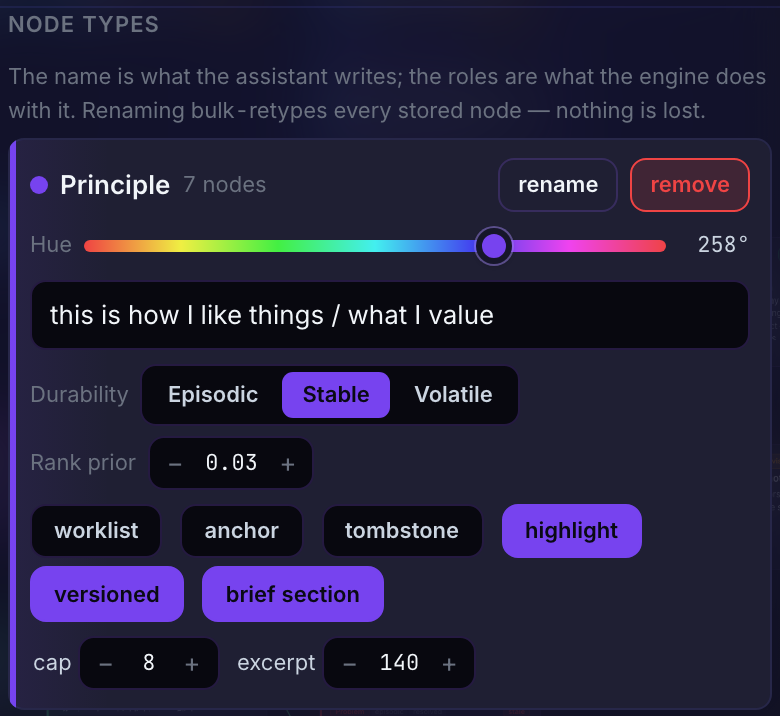
Each type is a card. You control:
- Name — what the assistant writes (
Decision,Claim,Rule, …). - Hue — a single 0–360 slider. Every other color is derived from it: the light-theme and dark-theme accents, and the muted variant for types that shouldn't shout. One input keeps every scheme coherent by construction — you can't pick a color that clashes with a theme.
- Thought — the one-line "what this type captures", shown when the assistant asks the graph to describe itself.
- Durability — how fast this type's knowledge ages (stable / episodic / volatile).
- Roles — the flags the engine keys on, never the name (see below).
- Brief section — whether this type gets its own section in the session brief, and how much of it.
Edge verbs
Verbs are cards too: the verb name, a worked example ("Decision because Principle"), and role flags. A triple must always read as an English sentence, so verb names stay lowercase and hyphen-joined.
Roles, not names
This is the idea that makes customization safe. The engine never looks at the string "conflicts-with" — it looks at which verb carries the contradiction role. Rename it to refutes, and every behavior follows: the conflict scan, the trust demotion, the red animated edge on the canvas. The roles you can assign:
| Role | On a type | |
|---|---|---|
| worklist | open/resolved lifecycle; lives in the brief's worklist, never decays while open | Problem, Intent |
| anchor | a code subject; carries code_refs, sits out the conflict scan, renders muted | Anchor |
| tombstone | a deletion marker: records deliberately removed knowledge so it isn't re-learned. Findable like any note, but sits out the conflict scan and the suspect queue; a write that lands near one carries a tombstoned warning, check_claim files it under retracted, and hard delete offers to mint one | Tombstone |
| highlight | may be accented on the canvas (off ⇒ always muted) | most types |
| rank prior | a small ranking nudge in search (never touches trust) | Principle, Caution |
| Role | On a verb | |
|---|---|---|
| supersession | creating it archives the older endpoint and chains history | replaces |
| contradiction | a judged one demotes trust and feeds the conflict queue | conflicts-with |
| reason | the "because" edge; its absence is what the structural checkup flags | because |
| answer | closes a worklist item | answers |
| dependency | a live blocker | needs |
| inherits | the source holds what the target holds: when a note contradicts or replaces the target, the source is queued for review against it (hint inherited). Unset = on for the dependency and reason verbs and builds-on; config key roles.inherits | builds-on, needs, because |
Two invariants hold across any configuration, and Save enforces them: edges stay sentence-shaped, and exactly one verb carries supersession and exactly one carries contradiction. Those two edges are what make the graph active rather than a note pile, so they can be moved to another verb but never removed.
Renaming carries your data
Renaming a type or verb from its card isn't a cosmetic relabel — it is the migration gesture. Rename Decision to Choice and every stored Decision becomes a Choice in the same step; the card shows how many nodes will follow. (A plain Save can't drop a type that still holds nodes — it tells you to rename them into another type first, so an edit can never strand knowledge.)
Presets
The redactor's preset shelf swaps the whole ontology at once. Four ship:
- Engram — the default 9-type product-building set. This is what every graph is born with.
- Research — for investigation-shaped work: Claim, Method, Question, Finding, Source, Task, Retraction, with
refutescarrying the contradiction role. - Minimal — three types (Rule, Note, Todo) for a graph that wants almost no ceremony.
- General — an open experimental set for saving almost anything: Fact, Note, Idea, Task, Reference, Tombstone — designed to pair with custom fields.
Applying a preset replaces types and verbs. Everything else is kept: policy (including the values auto-tune fitted to this graph), brief settings, version tracking, history and custom fields. On a graph that already holds nodes it only lands cleanly when the type names line up (or after you've retyped), for the same no-stranding reason as above.
Custom fields
Since 0.9.0 a graph can declare custom fields — your own first-class values on every note, beside the built-ins (title, tags, created_at, …). The redactor's Custom fields section defines them, and includes a built-in-fields reference so you can see the whole picture; a custom name can never shadow a built-in one (Save refuses the collision).
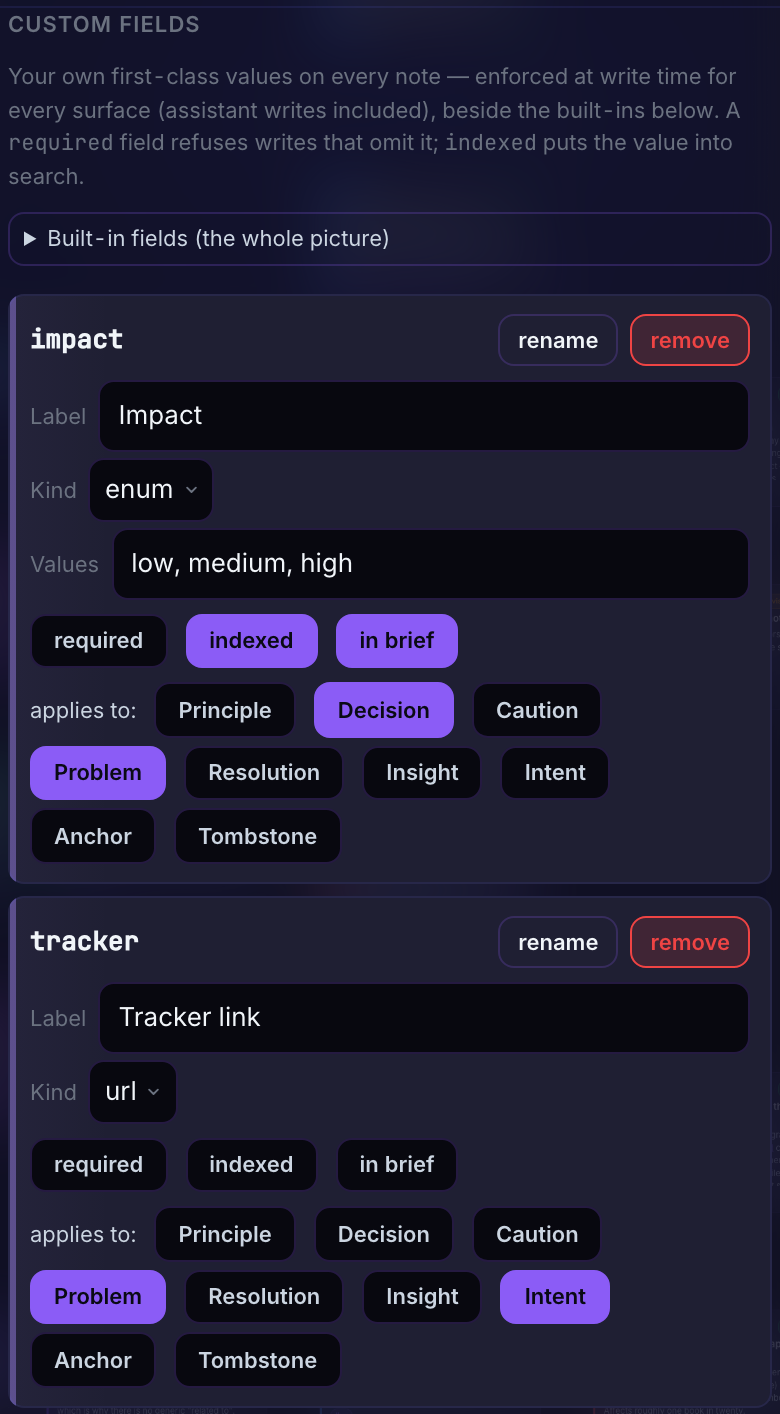
Each field has:
- Name — lowercase snake_case, the JSON key everywhere the node travels.
- Kind —
text,number,bool,date,enum(with its allowed values), orurl. Values are validated at write time, on every surface — the assistant's writes included. Adatefield is also a search clock:date_fieldon search aims theafter/beforewindow at it (or at afrom..topair with overlap semantics) instead ofcreated_at— see Recall & capture. - Required — writes of applicable types that omit the field are refused, with an error that teaches the full roster so the assistant self-corrects. (One deliberate exception: the tombstone a hard delete mints is engine-authored, so a required field can never veto your delete.)
- Applies to — limit the field to certain types, or leave it on all.
- Indexed — the value joins search (embedded with the note and in the keyword channel). Tepin-backed graphs only.
- In brief — render
name: valueon the note's brief lines.
The assistant passes values as "fields": {"name": value} on add_note/update_node (update merges; a null value deletes a key), and learns a graph's fields from describe_ontology. Defining or reshaping the fields themselves stays a user gesture — the pane, or PUT /config / POST /config/rename-field over HTTP. Renaming a field is a migration: every stored value moves with the name, like renaming a type.
Tuning trust, decay, and thresholds
The Trust & decay policy section exposes the fourteen numbers behind the trust model: the starting trust for a fresh note, the confirmed and approved anchors, how many days episodic and volatile knowledge take to fade, when a note reads as stale, how long it then waits before the decay pass archives it, and the similarity thresholds that decide when a write is a duplicate, a suspected conflict, or a near-miss worth a warning.
Every knob renders a plain-word explanation from the live values, so you're never editing a raw number in the dark — change the episodic window and the sentence under it re-reads to match. The defaults were dogfooded on this project's own graph; treat them as a good starting point, not a ceiling.
Composing the brief
The Brief composition section controls what the session-start digest includes and how big it gets: the character budget, which sections appear (tags, conflicts, suspects, recent, open work), and their caps. The switches worth knowing:
- Teach ontology — prepend a description of this graph's types and verbs to every brief. Off by default (the assistant already knows the shipped ontology); turn it on for a heavily customized graph so a fresh session learns the vocabulary immediately.
- Per-type brief section (on each type card) — which types get their own canon section, and how many entries.
- Note bodies (on by default) — entries carry a body excerpt after the title. Off, every entry is its title alone: worth it when your titles are already whole claims, since the same budget then holds more entries; keep it on when titles are short labels and the fact lives in the body.
- Canon order —
endorsed(default: pinned, then approved, then newest) orconnected(pinned, then trust weighted by how many live edges a note has, so the knowledge other notes lean on leads).connectedsuits a mature, well-linked graph. - With version tracking on, the brief opens with a Current cycle section: the open Intents and Problems stamped with the working version. The version itself is named once, on the brief's first line; entries carry a version stamp only when it is an older one.
- The Tasks section (the assistant's working list, right after the current cycle) is set in the Tasks section of Graph settings: on/off, how many titles, how many recently done, and after how many sessions an untouched task is marked idle. The same section turns tasks off for the graph altogether — see the pane.
Version tracking
Optional, per-graph. Turn on Track versions and set a current working version — anything free-form: v0.7.0, 26.7.23, sprint-14. From then on, every new note of a version-bound type is stamped with it, so the graph shows when each piece of knowledge was captured, and the brief announces the current version at the top.
Which types carry the stamp is a per-type role (versioned): in the shipped ontology, Principles and Anchors are exempt — a value or a code subject transcends any single release. Your assistant moves the version with the set_version tool when the project bumps; the switch history lives in the audit journal.
Handoff notes
Sometimes the most important thing in the graph is a message to the next session: an unfinished cutover, a "start here", a warning. Tag any open worklist note handoff and it gets guaranteed top placement in the next brief — "read first" — never crowded out by the budget. Once the note is acted on, resolving it stops the reminder; a forgotten one fades on its own. It's reactive memory without a new node type.
Teaching the assistant your ontology
Config is a user decision — the redactor and the HTTP API only; there are deliberately no MCP tools that let the assistant reshape your ontology, the same way pinning and hard-delete are yours alone. But the assistant still needs to know the shape:
- The
describe_ontologyMCP tool (and the optional brief section above) tell it this graph's live types, verbs, and roles on demand. - From the redactor's Assistant skill section you can (re)install the Claude Code capture skill. On a customized graph the skill is generated from your ontology — it teaches your actual type and verb names, your durability defaults, and your tuned trust numbers in plain words. Reinstall after reshaping the ontology so the skill and the graph stay in step.
Asking the assistant to change a setting
Since 0.9.8 the assistant can do the configuring for you, on your ask. The core serves an operator's guide at GET /guide — the manual behind every section on this page as HTTP recipes: the config document and its rules (PUT /config replaces the whole document; nothing still in use can be dropped; the rename routes migrate data), history recording, custom fields, presets, the brief's composition, policy knobs, version tracking, model swaps, encryption, the project registry, the checkup sweeps. The skills and the MCP instructions point the assistant there whenever you ask to change how memory behaves ("turn on history recording", "add a ticket field", "rename Decision to Choice", "switch to the research ontology"), and on a cold start it reviews the settings with you before seeding — a customized ontology or custom fields are worth choosing before the first hundred notes land. The ground rules the guide sets: read before write, never on the assistant's own judgment, say what changed, and reinstall the skill plus turn on Teach ontology after reshaping. Reading the guide yourself is a fine way to script a change with curl.
It travels with the graph
The whole configuration lives in the graph's own storage, so it follows the data everywhere: it survives the migration to a .tepin file, it rides along inside a JSON export and is restored on import, and each project in a multi-project setup keeps its own. A graph that never customizes carries no config document at all and behaves exactly like the shipped defaults — customization is strictly opt-in, all the way down.